|
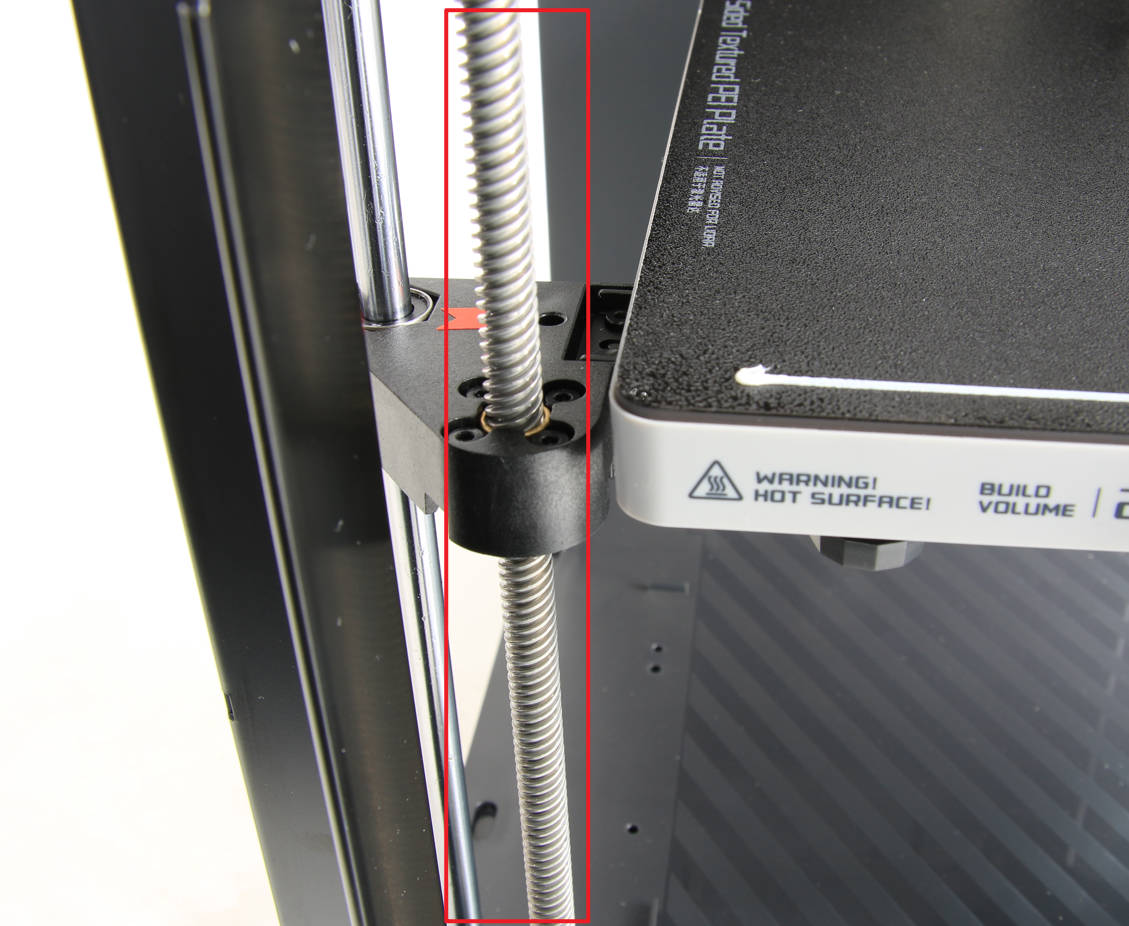
Day 6!! Since there’s hundreds of printers on the market, and there’s no guarantee that you bought the one I recommended (even if you should have…) I’ll keep these maintenance tips generic. On that note... LOOK UP YOUR MANUFACTURER’S RECOMMENDED MAINTENANCE.Each printer will have its unique quirks/features that will need to be maintained and will differ from one another. If you want to protect your investment, just do the maintenance. There’s essentially 3 categories of printer maintenance (for simplicity’s sake). #1 - DustingYour printer will get dusty. I strongly recommend enclosed printers in dusty environments for exactly that reason, but even those will get dusty eventually. For the P1S, Bambu recommends dusting the carbon rods, fans, and extruder gears regularly. For the carbon rods a microfiber cloth will do the trick, but for the fans and extruder gears I recommend compressed air. DO NOT PUT ANY LUBRICANT ON THE CARBON RODS as it can permanently damage your printer. For our print farm we purchased a rechargeable air compressor, which may be worth it for you if you print often enough, but the disposable cans will work perfectly fine for most hobbyists. #2 - CleaningYour printer will also get dirty, not just dusty. Some materials will get your printer dirtier faster than others (like ABS) but cleaning is another essential care step in protecting your printer. The main thing you’ll need to wash/clean regularly is your build plate. Some people will tell you to simply spray IPA (rubbing alcohol) on the bed and wipe, and while that’s good for removing small amounts of oil from our skin, it doesn’t do much for the buildup of residue/adhesive that will form over time. For these, all you need is some dish soap and a brush. I wash my print beds with dish soap once a month in my print farms, but hobbyists shouldn’t need to do it that frequently. Every 3-6 months or so should be a decent benchmark, but that also depends on how often you print. If you have any bed adhesion issues (or if you start to notice inconsistencies on the bottom of your prints) then you’ll know you went a bit too long this time. If you buy a printer with an enclosure, you’ll want to wash the glass as well. I wash the glass lid & glass door on my P1S’ any time I wash the print bed, just to keep everything in top shape. #3 - LubricatingThe final category here is potentially the most important of all, even if it’ll be done the least often. You’ll most likely want to lubricate any/all machine screws on your printer (see manufacturer’s instructions). For the P1S I lubricate the Z axis screws every other month, along with the idler pulleys. This is as simple as raising your print bed all the way to the top and applying a small amount of lubrication to the screws directly below the build plate, then lowering the plate all the way to the bottom. Then you do the same thing the other way around, adding lube to the screws just above the build plate this time, and using the homing function to raise the bed back up.
Again, *look up your manufacturer’s recommendations for printer maintenance* because they will all be different. If your 3d printer has an air filter on it (only enclosed printers) then changing that filter is something you need to be aware of as well. Some filaments let off pretty serious fumes, and you don’t want to mess around with those. Protect your health and make sure you regularly change your filter per your manufacturer’s guidance. Full P1S maintenance tips can be found at https://wiki.bambulab.com/en/p1/maintenance/p1p-maintenance I even made a maintenance checklist (mostly for P1P/P1S owners) you can download here That’s a Wrap!That’s it! That’s the end of the primer. I’ve done my best to make this a one stop to get you from complete newbie to printing with ease as quickly as possible. I know I can’t cover every single aspect of 3D printing, but this should get you started. Please consider sharing your feedback with us! There may be parts we skipped over without realizing it, or areas we need to expound further, and the only way we’ll find out is if you let us know! So please send all feedback (preferably constructive) to admin@wittworks.shop. Happy Printing! Drew - P.S. Since it’s technically not “getting started” 3D printing, there’s a 7th “bonus” email you’ll be getting tomorrow! (If you’re anything like me, it’s the next question you’re gonna ask yourself now that you’re all set up printing.) You won’t want to miss it! |